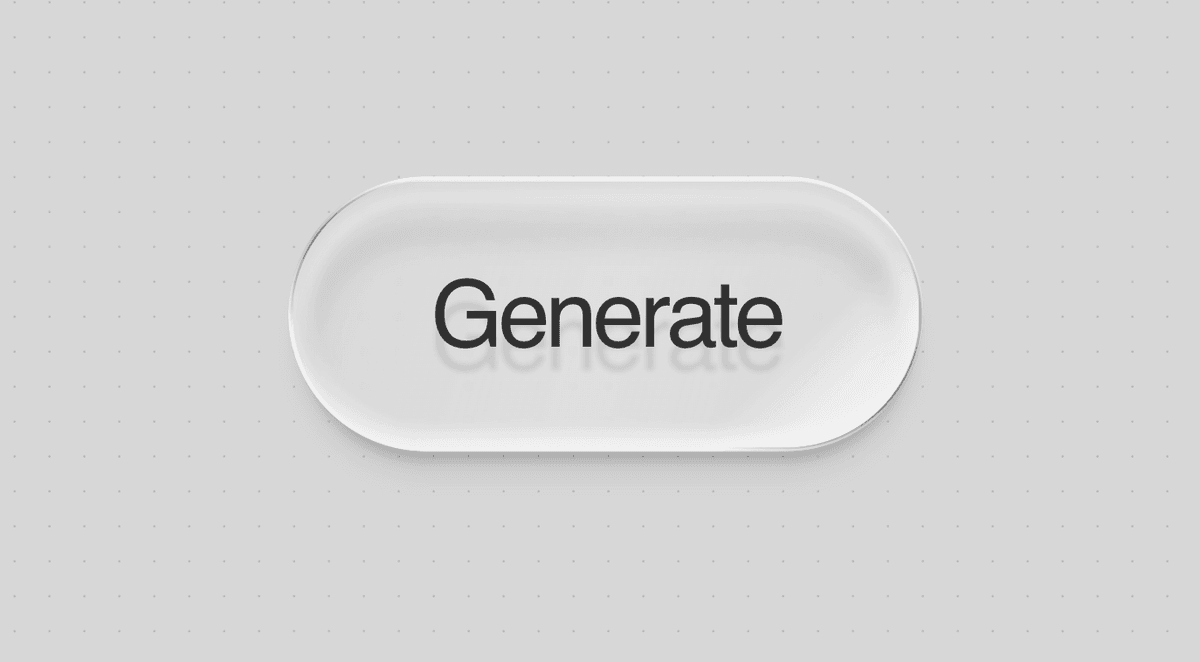
Recreate Petr Knoll's Glass Button in Next.js and Astro
Learn how to build a polished glass button with layered gradients, blur, border masking, and hover motion in both Next.js and Astro.
This glass button effect looks simple until you break it down. The polished result does not come from one backdrop-filter rule. It comes from several layers working together: a translucent gradient, blur, inner highlights, a masked border, a soft shadow, and a moving shine effect.
This guide recreates the effect direction inspired by Petr Knoll's CodePen and shows how to use it in both Next.js and Astro.
Credit: the original visual inspiration comes from Petr Knoll's CodePen.
What makes the button feel "glass"
The effect is built from small details that stack together:
- a semi-transparent surface gradient
- background blur to pick up whatever sits behind it
- inset light and shadow to shape the surface
- a thin masked border for the glossy edge
- a separate shadow layer so the button feels elevated
- a shine pass that moves slightly on hover
- a pressed state that changes depth rather than only scaling
If you skip most of these layers and only keep blur, the result usually looks flat.
Base markup
Keep the structure simple:
<div class="glass-button-wrap">
  <button class="glass-button">
    <span>Generate</span>
  </button>
  <div class="glass-button-shadow"></div>
</div>Each element has a job:
.glass-button-wraphandles pressed movement.glass-buttonrenders the main glass surfacespanholds the label and shine overlay.glass-button-shadowcreates the soft floating shadow
Separating the shadow from the button helps the depth read much better.
Core CSS
The following CSS is the full effect. You can place it in app/globals.css, src/styles/global.css, or another shared stylesheet.
@property --glass-angle-border {
  syntax: "<angle>";
  inherits: false;
  initial-value: -75deg;
}

@property --glass-angle-shine {
  syntax: "<angle>";
  inherits: false;
  initial-value: -45deg;
}

:root {
  --glass-hover-time: 400ms;
  --glass-hover-ease: cubic-bezier(0.25, 1, 0.5, 1);
}

.glass-demo-section {
  position: relative;
  min-height: 100vh;
  display: grid;
  place-items: center;
  overflow: hidden;
  background: rgb(215, 215, 215);
  font-family: Inter, system-ui, sans-serif;
}

.dotted-bg {
  position: absolute;
  inset: 0;
  z-index: 0;
  pointer-events: none;
}

.glass-button-wrap {
  position: relative;
  z-index: 2;
  display: inline-flex;
  border-radius: 999px;
  background: transparent;
  transition: transform var(--glass-hover-time) var(--glass-hover-ease);
}

.glass-button-shadow {
  --shadow-cutoff-fix: 2em;
  position: absolute;
  width: calc(100% + var(--shadow-cutoff-fix));
  height: calc(100% + var(--shadow-cutoff-fix));
  top: calc(0% - var(--shadow-cutoff-fix) / 2);
  left: calc(0% - var(--shadow-cutoff-fix) / 2);
  filter: blur(clamp(2px, 0.125em, 12px));
  pointer-events: none;
  overflow: visible;
}

.glass-button-shadow::after {
  content: "";
  position: absolute;
  inset: 0;
  border-radius: 999px;
  width: calc(100% - var(--shadow-cutoff-fix) - 0.25em);
  height: calc(100% - var(--shadow-cutoff-fix) - 0.25em);
  top: calc(var(--shadow-cutoff-fix) - 0.5em);
  left: calc(var(--shadow-cutoff-fix) - 0.875em);
  background: linear-gradient(180deg, rgba(0, 0, 0, 0.2), rgba(0, 0, 0, 0.1));
  padding: 0.125em;
  box-sizing: border-box;
  mask: linear-gradient(#000 0 0) content-box, linear-gradient(#000 0 0);
  mask-composite: exclude;
  transition: all var(--glass-hover-time) var(--glass-hover-ease);
}

.glass-button {
  --border-width: clamp(1px, 0.0625em, 4px);
  all: unset;
  position: relative;
  z-index: 2;
  cursor: pointer;
  border-radius: 999px;
  -webkit-tap-highlight-color: transparent;
  background: linear-gradient(
    -75deg,
    rgba(255, 255, 255, 0.05),
    rgba(255, 255, 255, 0.22),
    rgba(255, 255, 255, 0.05)
  );
  box-shadow:
    inset 0 0.125em 0.125em rgba(0, 0, 0, 0.05),
    inset 0 -0.125em 0.125em rgba(255, 255, 255, 0.55),
    0 0.25em 0.125em -0.125em rgba(0, 0, 0, 0.2),
    0 0 0.1em 0.25em inset rgba(255, 255, 255, 0.2);
  backdrop-filter: blur(clamp(1px, 0.125em, 4px));
  -webkit-backdrop-filter: blur(clamp(1px, 0.125em, 4px));
  transition:
    transform var(--glass-hover-time) var(--glass-hover-ease),
    box-shadow var(--glass-hover-time) var(--glass-hover-ease),
    backdrop-filter var(--glass-hover-time) var(--glass-hover-ease);
}

.glass-button span {
  position: relative;
  display: block;
  padding: 0.875em 1.5em;
  font-family: Inter, system-ui, sans-serif;
  font-size: clamp(2rem, 4vw, 5rem);
  font-weight: 500;
  line-height: 1;
  letter-spacing: -0.05em;
  color: rgb(50, 50, 50);
  user-select: none;
  text-shadow: 0 0.25em 0.05em rgba(0, 0, 0, 0.1);
  transition: text-shadow var(--glass-hover-time) var(--glass-hover-ease);
}

.glass-button span::after {
  content: "";
  position: absolute;
  z-index: 3;
  inset: calc(var(--border-width) / 2);
  border-radius: 999px;
  pointer-events: none;
  background: linear-gradient(
    var(--glass-angle-shine),
    rgba(255, 255, 255, 0) 0%,
    rgba(255, 255, 255, 0.5) 40%,
    rgba(255, 255, 255, 0.5) 50%,
    rgba(255, 255, 255, 0) 55%
  );
  background-size: 200% 200%;
  background-position: 0% 50%;
  background-repeat: no-repeat;
  mix-blend-mode: screen;
  transition:
    background-position calc(var(--glass-hover-time) * 1.25) var(--glass-hover-ease),
    --glass-angle-shine calc(var(--glass-hover-time) * 1.25) var(--glass-hover-ease);
}

.glass-button::after {
  content: "";
  position: absolute;
  z-index: 1;
  width: calc(100% + var(--border-width));
  height: calc(100% + var(--border-width));
  top: calc(0% - var(--border-width) / 2);
  left: calc(0% - var(--border-width) / 2);
  border-radius: 999px;
  padding: var(--border-width);
  box-sizing: border-box;
  background:
    conic-gradient(
      from var(--glass-angle-border) at 50% 50%,
      rgba(0, 0, 0, 0.45),
      rgba(0, 0, 0, 0) 5% 40%,
      rgba(0, 0, 0, 0.45) 50%,
      rgba(0, 0, 0, 0) 60% 95%,
      rgba(0, 0, 0, 0.45)
    ),
    linear-gradient(180deg, rgba(255, 255, 255, 0.55), rgba(255, 255, 255, 0.55));
  mask: linear-gradient(#000 0 0) content-box, linear-gradient(#000 0 0);
  mask-composite: exclude;
  box-shadow: inset 0 0 0 calc(var(--border-width) / 2) rgba(255, 255, 255, 0.5);
  transition:
    --glass-angle-border 500ms ease,
    box-shadow var(--glass-hover-time) var(--glass-hover-ease);
}

.glass-button:hover {
  transform: scale(0.975);
  backdrop-filter: blur(0.01em);
  -webkit-backdrop-filter: blur(0.01em);
  box-shadow:
    inset 0 0.125em 0.125em rgba(0, 0, 0, 0.05),
    inset 0 -0.125em 0.125em rgba(255, 255, 255, 0.5),
    0 0.15em 0.05em -0.1em rgba(0, 0, 0, 0.25),
    0 0 0.05em 0.1em inset rgba(255, 255, 255, 0.5);
}

.glass-button:hover span {
  text-shadow: 0.025em 0.025em 0.025em rgba(0, 0, 0, 0.12);
}

.glass-button:hover span::after {
  background-position: 25% 50%;
}

.glass-button:hover::after {
  --glass-angle-border: -125deg;
}

.glass-button-wrap:has(.glass-button:active) {
  transform: rotate3d(1, 0, 0, 25deg);
}

.glass-button:active span::after {
  background-position: 50% 15%;
  --glass-angle-shine: -15deg;
}

.glass-button-wrap:has(.glass-button:active) .glass-button {
  box-shadow:
    inset 0 0.125em 0.125em rgba(0, 0, 0, 0.05),
    inset 0 -0.125em 0.125em rgba(255, 255, 255, 0.5),
    0 0.125em 0.125em -0.125em rgba(0, 0, 0, 0.2),
    0 0 0.1em 0.25em inset rgba(255, 255, 255, 0.2),
    0 0.225em 0.05em 0 rgba(0, 0, 0, 0.05),
    0 0.25em 0 0 rgba(255, 255, 255, 0.75),
    inset 0 0.25em 0.05em 0 rgba(0, 0, 0, 0.15);
}

.glass-button:focus-visible {
  outline: 2px solid rgba(0, 0, 0, 0.35);
  outline-offset: 6px;
}

@media (hover: none) and (pointer: coarse) {
  .glass-button span::after,
  .glass-button:active span::after {
    --glass-angle-shine: -45deg;
  }

  .glass-button::after,
  .glass-button:hover::after,
  .glass-button:active::after {
    --glass-angle-border: -75deg;
  }
}

@media (prefers-reduced-motion: reduce) {
  .glass-button,
  .glass-button::after,
  .glass-button span,
  .glass-button span::after,
  .glass-button-wrap,
  .glass-button-shadow::after {
    transition: none;
  }
}Optional dotted background
The glass effect reads better when there is something behind it to blur. A soft dotted backdrop works well:
<svg
  class="dotted-bg"
  width="100%"
  height="100%"
  xmlns="http://www.w3.org/2000/svg"
>
  <defs>
    <pattern id="dottedGrid" width="30" height="30" patternUnits="userSpaceOnUse">
      <circle cx="2" cy="2" r="1" fill="rgba(0,0,0,0.15)" />
    </pattern>
  </defs>
  <rect width="100%" height="100%" fill="url(#dottedGrid)" />
</svg>Next.js version
Create the component:
type GlassButtonProps = {
  children?: React.ReactNode;
  onClick?: () => void;
};

export function GlassButton({
  children = "Generate",
  onClick,
}: GlassButtonProps) {
  return (
    <div className="glass-button-wrap">
      <button className="glass-button" onClick={onClick}>
        <span>{children}</span>
      </button>
      <div className="glass-button-shadow" />
    </div>
  );
}Use it on a page:
import { GlassButton } from "@/components/GlassButton";

export default function Page() {
  return (
    <main className="glass-demo-section">
      <svg
        className="dotted-bg"
        width="100%"
        height="100%"
        xmlns="http://www.w3.org/2000/svg"
      >
        <defs>
          <pattern
            id="dottedGrid"
            width="30"
            height="30"
            patternUnits="userSpaceOnUse"
          >
            <circle cx="2" cy="2" r="1" fill="rgba(0,0,0,0.15)" />
          </pattern>
        </defs>
        <rect width="100%" height="100%" fill="url(#dottedGrid)" />
      </svg>

      <GlassButton>Generate</GlassButton>
    </main>
  );
}Put the shared CSS in app/globals.css or another global stylesheet loaded by your app.
Astro version
Create the component:
---
const { label = "Generate" } = Astro.props;
---

<div class="glass-button-wrap">
  <button class="glass-button">
    <span>{label}</span>
  </button>
  <div class="glass-button-shadow"></div>
</div>Use it in a page:
---
import GlassButton from "../components/GlassButton.astro";
import "../styles/global.css";
---

<main class="glass-demo-section">
  <svg
    class="dotted-bg"
    width="100%"
    height="100%"
    xmlns="http://www.w3.org/2000/svg"
  >
    <defs>
      <pattern id="dottedGrid" width="30" height="30" patternUnits="userSpaceOnUse">
        <circle cx="2" cy="2" r="1" fill="rgba(0,0,0,0.15)" />
      </pattern>
    </defs>
    <rect width="100%" height="100%" fill="url(#dottedGrid)" />
  </svg>

  <GlassButton label="Generate" />
</main>Put the shared CSS in src/styles/global.css.
How to scale it down for production UI
The original effect is oversized for a demo. For a real CTA, reduce padding and font size:
.glass-button span {
  padding: 0.9rem 1.6rem;
  font-size: 1rem;
  letter-spacing: -0.02em;
}For a larger hero button:
.glass-button span {
  padding: 1rem 2rem;
  font-size: 1.125rem;
  letter-spacing: -0.02em;
}Dark version
On dark surfaces, tweak the contrast instead of redoing the whole component:
.glass-demo-section {
  background: rgb(20, 20, 20);
}

.glass-button span {
  color: rgba(255, 255, 255, 0.9);
  text-shadow: 0 0.25em 0.05em rgba(0, 0, 0, 0.25);
}

.glass-button {
  background: linear-gradient(
    -75deg,
    rgba(255, 255, 255, 0.04),
    rgba(255, 255, 255, 0.16),
    rgba(255, 255, 255, 0.04)
  );
}The CSS details that matter most
1. Translucent surface
background: linear-gradient(
  -75deg,
  rgba(255, 255, 255, 0.05),
  rgba(255, 255, 255, 0.22),
  rgba(255, 255, 255, 0.05)
);This gives the button a reflective body instead of a flat fill.
2. Backdrop blur
backdrop-filter: blur(clamp(1px, 0.125em, 4px));This pulls background texture into the button. Without something behind the button, the effect will feel weaker.
3. Masked border
mask: linear-gradient(#000 0 0) content-box, linear-gradient(#000 0 0);
mask-composite: exclude;This lets the border appear as a thin shell around the button rather than a full overlay.
4. Separate shadow layer
The shadow is not attached directly to the button surface. That keeps the blur and the elevation feeling cleaner.
5. Small motion changes
The hover and active states do not just scale the component. They also shift border angle, shine position, and depth. That is what makes the interaction feel premium.
Accessibility notes
If you use this in production, keep these details:
- keep visible
:focus-visiblestyles - respect
prefers-reduced-motion - avoid very low-contrast text on busy backgrounds
- use a real
<button>for actions and a real<a>for navigation
Final thoughts
The nice part about this effect is that it is mostly reusable CSS. Once the layers are in place, you can scale the typography, colors, and spacing to fit almost any interface.
If you want the component to feel expensive, focus less on "glassmorphism" as a label and more on the tiny visual decisions: edge contrast, shadow softness, shine direction, and pressed depth.